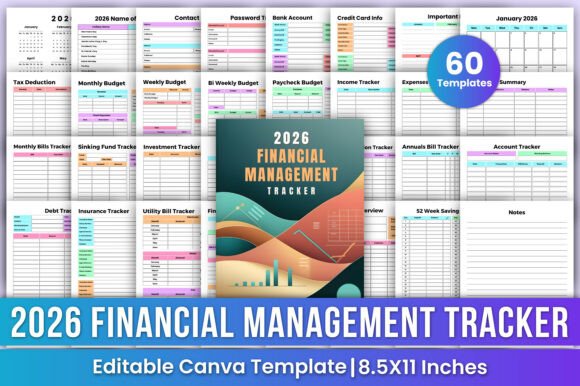
2026 Financial Management Tracker Canva: Your Flexible, All-in-One Money Planner for Real Life
If you’ve ever opened a spreadsheet in January full of enthusiasm—only to abandon it by March—you’re not alone. Budgeting tools often fail not because they’re too complex, but because they don’t adapt to how life actually unfolds: surprise car repairs, shifting pay schedules, seasonal spending spikes, or even the quiet stress of forgetting that gym subscription auto-renews every month. That’s where the 2026 Financial Management Tracker Canva stands apart—not as another rigid spreadsheet or static PDF, but as a living, editable planner built for real-world financial rhythms.
What It Really Is (Beyond the Buzzwords)
The 2026 Financial Management Tracker Canva is a fully editable digital planner designed from the ground up for people who want clarity—not clutter. Unlike generic templates, it’s pre-structured around how money moves *in practice*: weekly groceries, bi-weekly paychecks, quarterly insurance premiums, annual donations, and even sinking funds for holiday gifts or home maintenance. Every page serves a purpose grounded in lived experience—not accounting theory.
Because it lives on Canva, you’re not locked into someone else’s color scheme, font hierarchy, or layout logic. You can change the header font to match your personal brand, swap teal for warm terracotta, move the “Sinking Fund Tracker” next to your monthly budget if that’s how your brain works—or duplicate a page to track two separate side-hustle incomes. That flexibility isn’t just aesthetic—it lowers the mental barrier to consistent use.
Where It Fits Into Real Life (Not Just New Year’s Resolutions)
For the freelancer juggling three clients and uneven cash flow: The Paycheck Budget and Income Tracker pages let you map variable income against fixed deadlines—no more guessing whether that $1,850 invoice covers rent *and* the HVAC tune-up. Pair it with the Quarterly Bills Tracker, and you’ll spot when Q3 taxes, property tax installments, and your business insurance renewal all land in the same six-week window.
For parents managing household logistics and shared finances: The Contact List and Password Tracker pages aren’t afterthoughts—they’re lifelines. One partner handles school lunch payments and dental co-pays; the other manages streaming logins and utility accounts. With editable access, both can update credentials or note “Cable bill increased $12—see Notes page”—without digging through old texts or sticky notes.
For early-career professionals building net worth: Tracking retirement contributions across multiple accounts (401(k), Roth IRA, HSA) feels overwhelming—until you use the Retirement Summary and Investment Tracker side by side. Add the Net Worth Tracker, updated quarterly, and you start seeing progress not just in dollars, but in direction: “My emergency fund grew 22% while credit card debt dropped 38%—that’s momentum.”
For caregivers balancing aging parents’ expenses: The Important Notes and Insurance Info pages become critical infrastructure. Jot down policy numbers, claim timelines, or pharmacy refill dates—and link them directly to the Monthly Budget so long-term care co-pays don’t derail your own savings goals.
How Different Needs Shape How You Use It
A small-business owner might rename “Bank Account Tracker” to “Business Checking + Payroll Account” and add columns for estimated quarterly tax withholdings. A college student could hide the Tax Deduction section entirely and spotlight the Subscription Tracker and Donation Tracker (yes—even $5/month to a cause matters when you’re budgeting $200/week).
Someone paying off student loans may pin the Debt Tracker and Savings Challenge pages front-and-center, using the “52-Week Savings Challenge” template not for vacation money—but for an extra loan payment each month. Meanwhile, a couple planning to buy their first home might duplicate the Yearly Overview page to compare “Current Net Worth” vs. “Target Net Worth at Closing.”
Things to Consider Before You Dive In
This tracker shines when you treat it like a tool—not a test. If you’re hoping for automatic bank feeds or AI-powered spending categorization, it won’t deliver those. It’s manual, intentional, and human-centered. That’s its strength *and* its boundary.
You’ll get the most value if you’re comfortable spending 10–15 minutes each week reviewing, updating, and reflecting—not just logging numbers. Think of it less like QuickBooks and more like a financial journal with guardrails.
Also worth noting: while Canva makes editing easy, the free tier has limits on brand kits and some export options. If you plan to print high-res copies or share branded versions with a spouse or accountant, the Canva Pro subscription unlocks smoother collaboration and PDF exports without watermarks.
Why “Editable on Canva” Changes Everything
Most planners ask you to adapt to their structure. The 2026 Financial Management Tracker Canva flips that script. Forgot to add your new health savings account? Duplicate the Bank Account Tracker page and relabel it. Switched from bi-weekly to semi-monthly pay? Swap out the Bi-Weekly Budget for two Paycheck Budget pages instead of wrestling with merged cells.
Even small edits matter: changing “Utilities” to “Utilities + Internet + Phone” in the Expenses Tracker, or adding a “Notes” column to the Credit Card Tracker to flag which card earns bonus points on gas. These aren’t features you configure in settings—they’re decisions you make *as your needs evolve*.
It’s Not About Perfection—It’s About Presence
Money management isn’t about hitting zero on every category by midnight December 31st. It’s about knowing where your money goes *before* it disappears. It’s remembering that your “$9.99/month meditation app” adds up to $120/year—enough for two oil changes. It’s spotting that “donations” spiked in November and December—not because you’re suddenly more generous, but because year-end giving reminders flooded your inbox.
The 2026 Financial Management Tracker Canva doesn’t promise effortless wealth. But it does offer something rarer: a clear, calm, customizable space to notice, adjust, and choose—month after month, paycheck after paycheck, goal after goal.