Programming Workbook Guide: A Practical Entry Point for Early Coding Education
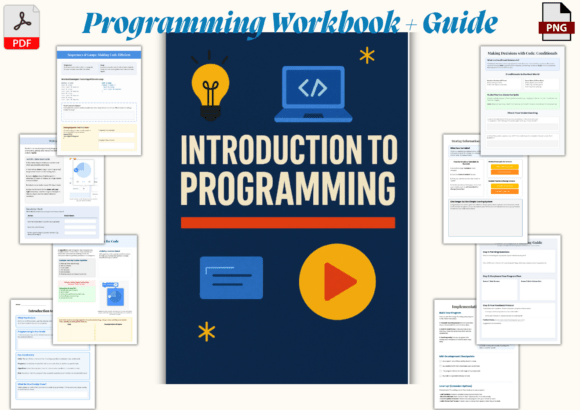
Teaching programming to beginners—especially children and early teens—is less about syntax and more about cultivating logical thinking, pattern recognition, and resilience in problem-solving. The Programming Workbook Guide stands out not as a comprehensive curriculum, but as a tightly focused, tactile introduction that meets learners where they are: curious, visually oriented, and eager to create rather than memorize. At 22 pages and sized at 8.5 x 11 inches, it’s intentionally compact—not an exhaustive reference, but a thoughtfully sequenced on-ramp.
What It Is—and What It Isn’t
The Programming Workbook Guide is a printed, interactive workbook designed for independent or facilitated learning. It does not require digital setup to begin, though it directs students toward hands-on practice in Scratch and Python. Its core value lies in scaffolding abstract concepts—like variables, loops, conditionals, and algorithmic sequencing—through guided visual exercises, annotated flowcharts, and low-stakes mini-projects. Unlike many digital-first tools, it prioritizes pen-and-paper reflection before screen time, encouraging learners to sketch logic flows, trace code execution manually, and annotate outputs before running anything.
This isn’t a replacement for a full coding platform or LMS integration. It doesn’t include teacher lesson plans, assessment rubrics, or adaptive feedback. But as a supplementary resource—or even a primary starter tool for short-term workshops, after-school clubs, or summer enrichment—it fills a specific gap: bridging conceptual understanding with early implementation, without overwhelming cognitive load.
Design Choices That Support Learning
The workbook’s clean, color-coded layout supports comprehension without distraction. Each concept appears across two facing pages: left-side explanation with concise definitions and analogies (e.g., “A loop is like a recipe step you repeat until the cake is done”), and right-side guided practice—often involving drag-and-drop logic blocks, fill-in-the-blank pseudocode, or tracing sample outputs. Visual consistency matters here: recurring icons denote “Think,” “Try,” “Debug,” and “Create” prompts, reinforcing metacognitive habits.
Scratch activities focus on block-based logic—sequencing sprites, handling user input, and nesting conditional checks—while Python sections introduce syntax gradually: first printing strings, then storing values in variables, then iterating over simple lists. Crucially, the Python examples avoid abstraction; all variables represent concrete things (“score = 0”, “lives = 3”), and loops always tie back to observable outcomes (“repeat this sound 5 times”, “move the cat 10 steps”). This grounding in tangible cause-and-effect helps prevent early disengagement.
Real-World Usability Across Settings
In classroom use, educators report that the Programming Workbook Guide works well as a station activity or warm-up—particularly when paired with a shared Scratch project board or a live-coding demo. Its portability makes it viable for schools with limited device access: students can complete planning and logic exercises offline, then apply them during scheduled lab time. Homeschooling families appreciate its self-contained structure; no login, no subscriptions, no troubleshooting connectivity issues.
For independent learners aged 9–14, the pacing holds attention. One educator observed that students who typically disengage during lecture-style instruction remained engaged through the workbook’s “predict-then-test” prompts—such as predicting what a nested loop will draw before executing it in Scratch. That emphasis on anticipation and verification builds debugging intuition early.
That said, its brevity means it won’t sustain long-term progression. After completing the final Python mini-project (a simple number-guessing game), learners need a clear next step—whether that’s transitioning to Replit, joining a Code Club, or moving into a structured course like CS First. The Programming Workbook Guide prepares them for that transition, but doesn’t provide it.
Strengths Beyond the Page Count
- Conceptual clarity over tool mastery: It teaches *how to think like a programmer*, not just how to use Scratch or Python. Flowcharting, pseudocode, and manual tracing reinforce computational thinking independently of platform.
- Low barrier, high fidelity: No software installation, no accounts, no permissions. Yet the concepts align precisely with K–12 computer science standards (CSTA, ISTE) for introductory programming.
- Print quality and usability: Thick paper stock prevents bleed-through with markers or colored pencils. Ample margins and generous line spacing accommodate varied handwriting sizes and motor skill development.
- Consistent voice and tone: Explanations avoid condescension or excessive anthropomorphism (“the computer is your friend!”). Instead, they use direct, respectful language—e.g., “Variables store information so your program remembers what happened earlier.”
Who Benefits Most—and When
The Programming Workbook Guide serves three primary audiences especially well:
- Classroom teachers seeking a no-tech-required warm-up or review tool—particularly in STEM-integrated units (e.g., using loops to model plant growth cycles or conditionals in weather prediction logic).
- Homeschooling parents or tutors who want a structured, evidence-informed starting point without curating dozens of free online resources.
- Youth program coordinators (libraries, makerspaces, community centers) needing a portable, reusable activity for drop-in coding events or summer camps with mixed experience levels.
It’s less suited for older teens or adults seeking career-aligned Python training, or for educators requiring built-in differentiation for advanced learners. Its scaffolding assumes no prior exposure—not even typing proficiency—so users significantly beyond that baseline may find early sections too slow-paced.
Practical Considerations and Limitations
Because it’s print-only, there’s no auto-graded feedback or progress tracking. Educators should plan light facilitation—reviewing hand-drawn flowcharts, discussing prediction errors, or pairing workbook exercises with quick verbal debriefs. Also, while Scratch and Python are both covered, the Python portion remains highly constrained: no functions, no input validation, no file handling. That’s by design—not a shortcoming—but users expecting broader language coverage will need to look elsewhere.
One subtle strength worth noting: the workbook avoids gamified point systems or extrinsic rewards. Progress is measured through completion of logic challenges and successful mini-projects—not badges or leaderboards. This supports intrinsic motivation, particularly for learners who respond poorly to competitive framing.
Making It Work Long-Term
To extend the Programming Workbook Guide’s usefulness, pair it with low-friction next-step resources. For example:
- After the Scratch section, guide learners to remix one of the official Scratch starter projects—using the workbook’s logic diagrams as a planning tool.
- Following the Python mini-project, introduce Trinket or Replit for browser-based editing, letting students expand their guessing game with scorekeeping or difficulty levels.
- Use the workbook’s “debug this code” pages as templates for creating custom error-analysis exercises aligned to your students’ common misconceptions.
In sum, the Programming Workbook Guide succeeds because it respects the learner’s cognitive load, honors the importance of physical interaction in early concept formation, and delivers rigor without jargon. It won’t replace a full curriculum—but for building foundational confidence, clarifying *why* code behaves the way it does, and giving young coders a tangible artifact of their early progress, it earns its place on the shelf.