2026 Online Business Workbook Canva
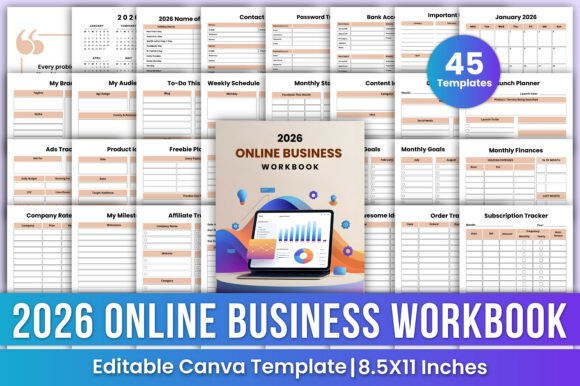
The 2026 Online Business Workbook Canva is a digital, editable planner designed specifically for entrepreneurs and digital creators who manage online businesses. Built for use in Canva, it provides a unified set of templates covering brand development, content planning, financial tracking, campaign launches, advertising, and day-to-day operations. Unlike static PDF planners, each page is fully customizable—text, colors, fonts, and layout elements can be adjusted directly within Canva. Users also receive high-resolution printable PDF files, allowing for both digital use and physical printing.
This workbook is not software or a subscription service. It is a downloadable digital product: a collection of Canva-designed templates organized into functional categories. Its structure reflects common operational needs across solopreneurs, coaches, course creators, bloggers, and small digital product sellers—those who juggle multiple responsibilities without dedicated administrative support.
Why Consider the 2026 Online Business Workbook Canva?
Entrepreneurs often face fragmented workflows—using separate tools for scheduling, finances, content ideas, and client notes. The 2026 Online Business Workbook Canva responds to that challenge by consolidating many of those functions into one consistent visual system. For someone already using Canva for branding or social media design, adopting this workbook introduces minimal friction: no new login, no learning curve for core functionality, and immediate alignment with existing visual assets.
It may appeal particularly to users who value clarity over automation. While it doesn’t sync with calendars or bank accounts, it offers structured spaces—like a Monthly Finances tracker, Affiliate Tracker, or Order Tracker—that encourage regular review and manual input. That discipline supports intentionality, especially during early-stage business development or seasonal planning cycles.
Benefits and Practical Advantages
One key strength is flexibility. Because all pages are editable in Canva, users can adapt the workbook to match their brand voice, visual identity, or specific workflow priorities. A coach might emphasize the Welcome Series Planner and Client Notes sections, while a Pinterest-focused creator may prioritize the Pinterest Pin Tracker and Content Ideas pages.
The inclusion of dated 2026 monthly planners—complete with U.S. holidays and blank weekly schedules—supports forward-looking planning without requiring external date lookups. Pages like My Brand, My Audience, and Company Rates Tracker prompt foundational reflection, helping users document decisions that are often left implicit or scattered across notes apps.
Print-ready PDFs add utility for those who prefer tactile planning or need offline access. This dual-format approach—digital editing plus physical output—makes it usable across contexts: brainstorming on screen, reviewing finances on paper, or presenting brand strategy to collaborators.
Tradeoffs and Realistic Expectations
Because the 2026 Online Business Workbook Canva relies on manual entry and lacks integrations, it does not replace tools like QuickBooks, Trello, Notion, or Google Calendar. There’s no auto-syncing of deadlines, no calculation of profit margins, and no reminders. Users must consistently update entries to maintain accuracy and usefulness.
Canva’s free tier supports basic editing, but some advanced features—such as resizing templates across formats or accessing premium fonts—require a Canva Pro subscription. While most users won’t need Pro to personalize text and color, those aiming for highly polished branded printouts may encounter limitations without it.
Also, the workbook follows a fixed structure. Though editable, its underlying framework remains the same across users. Those with highly specialized workflows—such as e-commerce sellers managing inventory across multiple platforms or agencies handling dozens of clients—may find certain sections too generic or insufficiently granular.
When It’s a Strong Fit
The 2026 Online Business Workbook Canva works well for individuals who:
- Prefer a single, cohesive planning system over juggling multiple apps;
- Already use Canva regularly and want consistency in design and workflow;
- Are building or refining their brand identity and benefit from guided prompts (e.g., My Brand, My Audience);
- Need dated 2026 planning tools but want customization—not just pre-filled calendars;
- Value tangible outputs (printed pages) alongside digital convenience;
- Want lightweight structure without complex setup or recurring fees.
It’s especially useful at year-start or before major launches—when clarifying goals, mapping content pipelines, or auditing financial assumptions matters more than real-time data syncing.
When Alternatives May Be Worth Exploring
For users whose priority is automation, collaboration, or scalability, other options merit consideration. Notion-based workbooks offer dynamic databases, linked views, and permission controls—better suited for teams or evolving systems. Spreadsheets (Google Sheets or Excel) provide formula-driven calculations and custom reporting, ideal for finance-heavy roles. Dedicated project management tools like ClickUp or Asana streamline task delegation and deadline tracking across contributors.
If long-term adaptability is critical—say, for a business expecting rapid growth over several years—a modular system (e.g., building custom dashboards in Notion) may offer more room to evolve than a fixed-year workbook. Similarly, those needing accessibility features (screen reader compatibility, keyboard navigation) should verify how well the Canva interface and exported PDFs meet those requirements.
Making an Informed Decision
To determine whether the 2026 Online Business Workbook Canva aligns with your needs, ask yourself:
- What tasks do I currently handle across three or more tools? If many relate to planning, branding, or content—rather than invoicing or team coordination—the workbook could consolidate effort.
- Do I update my plans manually each week or month? If yes, the workbook’s structure supports that habit. If you rarely review plans unless prompted by alerts or notifications, a tool with built-in reminders may serve you better.
- How important is visual consistency with my brand? If matching fonts, colors, and tone across documents matters for client-facing materials, Canva’s editing capabilities add tangible value.
- Am I comfortable downloading, opening in Canva, and saving customized versions? Technical comfort here affects long-term usability more than feature depth.
No single planner fits every entrepreneur. The 2026 Online Business Workbook Canva occupies a practical middle ground: more adaptable than static printables, less automated than integrated SaaS tools. Its usefulness grows with intentional use—not passive ownership. Reviewing its table of contents against your current pain points, rather than marketing descriptions, is the most reliable way to assess fit.