2026 Shopify Store Planner
Your All-in-One Operational Blueprint for E-Commerce Success
The 2026 Shopify Store Planner isn’t just another digital calendar or generic notebook—it’s a purpose-built, year-long strategic companion designed specifically for entrepreneurs launching, scaling, or refining their Shopify stores in 2026. Whether you're a solopreneur testing your first product idea, a creative selling handmade goods, or a small team managing multiple SKUs and campaigns, this planner bridges the gap between vision and execution. What sets it apart is its dual nature: a fully editable 2026 Shopify Store Planner Canva Interior, plus print-ready, high-resolution PDF files optimized for Amazon KDP publishing.
More Than a Calendar—A Business Operating System
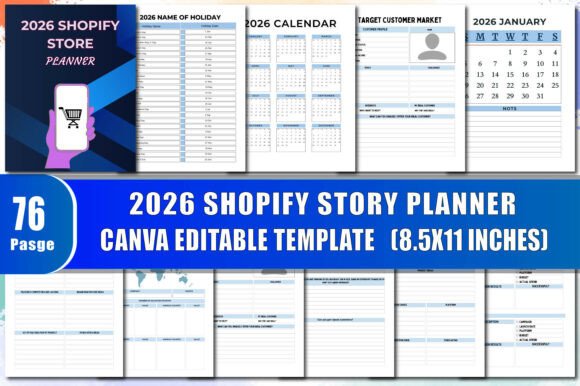
At its core, the 2026 Shopify Store Planner transforms abstract goals into actionable steps. It includes a full 12-month 2026 calendar—each month clearly labeled with U.S. federal holidays (e.g., Martin Luther King Jr. Day in January, Labor Day in September) and key retail dates like Cyber Monday and Small Business Saturday. But unlike standard planners, every page serves a functional role:
- This Book Belongs To — A personalized cover page to claim ownership and build accountability.
- Where To Sell & Target Customer Market — Dedicated space to map channels (Shopify, Etsy, Amazon, pop-ups) and define ideal buyers using real-world filters like age, pain points, and buying habits.
- Sales Map & Go-to-Market Plan — Visual layout tools to plot launch timelines, inventory milestones, and channel-specific promotions.
- Product Research & Problem-Solution Canvas — Guided prompts help validate demand before investing in production or ads.
- Pre-Launch Costs & Spending Log — Track domain fees, app subscriptions, sample orders, and design expenses—no more guessing at startup overhead.
- Advertising Tracker & Post Planner — Log ad spend by platform (Meta, TikTok, Google), note creatives tested, and schedule social posts weeks in advance.
- Order Tracker, Income Tracker & Packaging Inventory — Real-time visibility into fulfillment flow, profit margins, and supply chain readiness.
Designed for Flexibility—Not Just Filling In
The 2026 Shopify Store Planner Canva Interior is where adaptability shines. You receive layered, professionally designed Canva templates—ready to upload or edit instantly. Change colors to match your brand palette. Swap icons, adjust fonts, or reposition sections to prioritize what matters most to *your* workflow. Add custom shapes for visual goal mapping. Insert your logo on the “This Book Belongs To” page. Even rename headers—turn “Stall Display Inventory” into “Pop-Up Kit Checklist” if you’re prepping for craft fairs. Every element is editable—no design skills required.
Once finalized, export as high-quality, CMYK-optimized PDFs: crisp text, bleed-safe margins, and embedded fonts. These are print-ready for Amazon KDP—ideal for creators who want to sell physical planners alongside digital downloads. Or keep them fully digital: use on tablets with stylus support, share editable links with your team, or embed in Notion dashboards.
Who Benefits Most—and Why
While anyone building an online store can gain value, three groups see especially strong ROI:
- New Shopify Store Owners: Launching without a roadmap often means missed deadlines, overspent ad budgets, or delayed product launches. The 2026 Shopify Store Planner structures the chaos—guiding users from “Product Ideas” through “Launch Your Shop” with built-in checklists like the Product SEO Checklist and Release Date Tracker.
- Creative Professionals & Makers: Illustrators, ceramicists, and indie designers juggle creation, marketing, and fulfillment. Sections like Newsletter Subscribers, Waiting List Sign Up, and Pre-Order Sign Up Sheet help monetize interest early—turning followers into committed buyers before inventory arrives.
- Small Teams & Side-Hustlers Scaling Up: When growth brings complexity, scattered notes across apps slow progress. With consolidated tools like Product Updates, Campaign Manager, and Goal Action Plan, teams align on priorities, delegate tasks, and measure progress against quarterly targets—not just daily to-dos.
Real-World Use Cases That Work
Consider Maya, a jewelry maker launching her first Shopify store in March 2026. She uses the 2026 Shopify Store Planner to:
- Map her Product Research phase in January—surveying Instagram Stories, analyzing competitor pricing, and sketching designs based on seasonal trends noted in the 2026 calendar.
- Fill out the Problem-Solution section in February—clarifying how her hypoallergenic earrings solve discomfort for sensitive ears, then linking that message directly to her Marketing Plan copy.
- Track pre-orders in April using the Pre-Order Sign Up Sheet, then cross-reference that number against her Packaging Inventory and Spending Log to adjust production quantities before manufacturing begins.
Or take David, running a two-person Shopify agency. He duplicates the Campaign Manager and Advertising Tracker pages for each client, color-coding by brand. He shares editable Canva links with clients so they update order volumes or campaign feedback in real time—reducing email clutter and speeding up revisions.
What to Keep in Mind
The 2026 Shopify Store Planner excels at structure—but it doesn’t replace decision-making. Its power comes from consistent use, not passive ownership. If you skip filling out the Sales Map or ignore the Product Analysis prompts, you’ll miss its strategic depth. Also, while the Canva interior offers immense flexibility, advanced automation (like live Shopify API syncs or auto-calculated profit margins) isn’t included—it’s intentionally manual to encourage reflection and intentionality.
It’s also worth noting: the holiday dates reflect U.S. federal observances. International sellers should verify local holidays separately—but the clean, modular layout makes adding regional dates simple via Canva editing.
Getting Started Is Intentional—Not Instant
You won’t find vague affirmations or decorative quotes here. Every page invites action. Start with the Goal Action Plan—define one measurable outcome for Q1 2026 (e.g., “Achieve $5,000 in net revenue by March 31”). Then flip to the Marketing Plan to outline the three channels you’ll test. Use the Product Planner to list materials, suppliers, and unit costs *before* ordering samples. Revisit the Income Tracker weekly—not just to record sales, but to ask: Which product drove 80% of margin? What ad set had the lowest CPA?
That habit—of pairing data with reflection—is where the 2026 Shopify Store Planner delivers lasting value. It doesn’t promise overnight success. Instead, it gives you the framework to build momentum, learn faster, and reduce costly missteps—all within a single, cohesive, beautifully designed system.
Final Thought: Tools Don’t Build Businesses—People Do
A planner is only as powerful as the person using it. The 2026 Shopify Store Planner removes guesswork, organizes complexity, and surfaces what truly moves the needle. Paired with the editable freedom of the 2026 Shopify Store Planner Canva Interior, it becomes both a tactical workbook and a living business document—one that grows with your store, adapts to your voice, and stays useful whether you’re planning your first launch or your fifth product line.